
What Is DMARC and Why Your Business Email Is Probably Exposed Right Now
Right now, someone could send an email that looks exactly like it came from your domain. Your customers would see your company name, your email address,and have no reason to doubt it. They might click a link, wire money, or hand over credentials. And your domain would be the one that signed off on it.
This is not a hypothetical. It happens every day to businesses that have not configured DMARC enforcement. The uncomfortable truth is that most domains, including yours... are likely vulnerable right now.
What Is DMARC?
DMARC stands for Domain-based Message Authentication, Reporting, and Conformance. It is a DNS-based email authentication protocol that tells receiving mail servers what to do when an email claiming to come from your domain fails authentication checks.
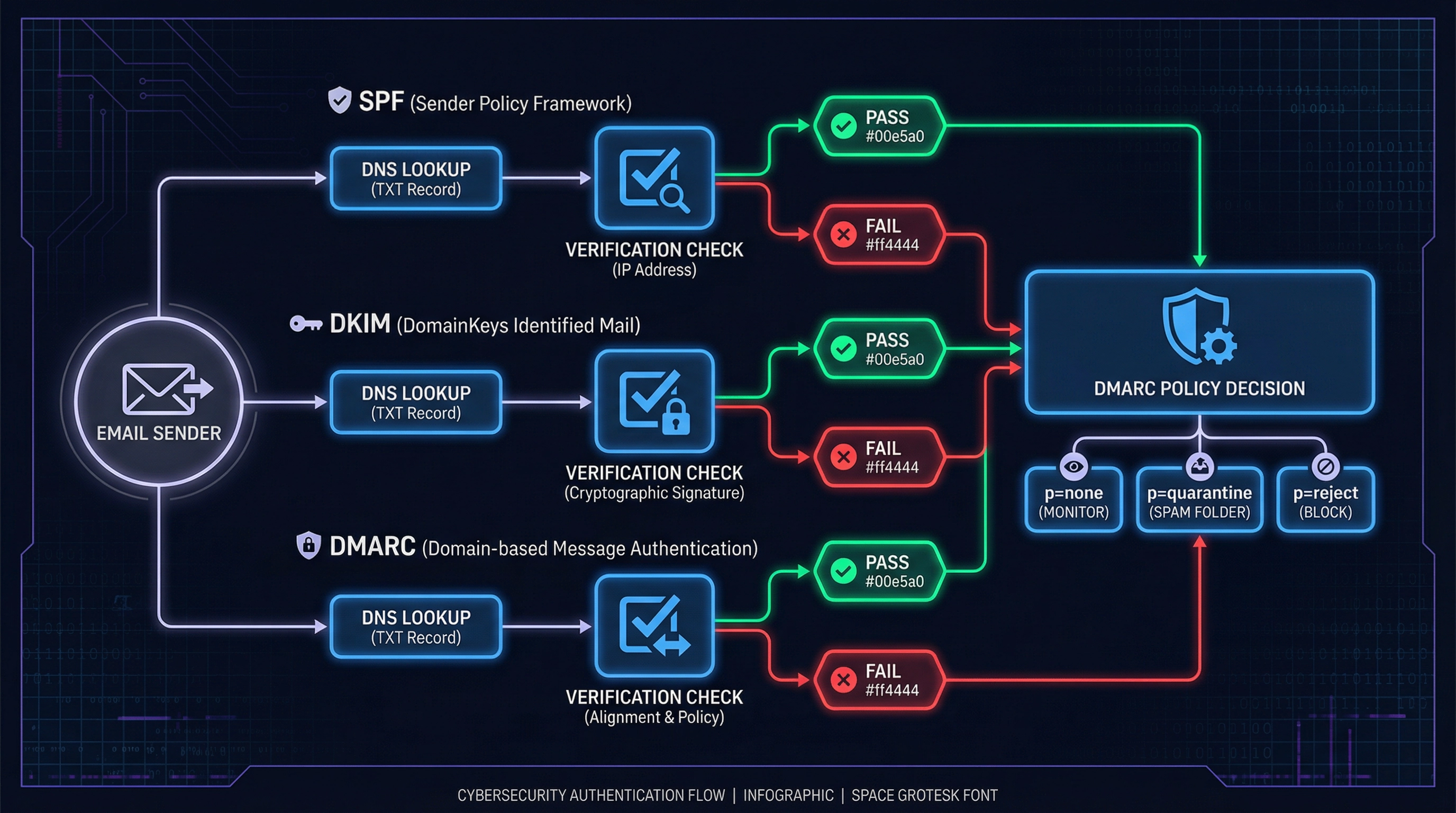
But to understand DMARC, you first need to understand the two protocols it builds on: SPF and DKIM.
SPF: Sender Policy Framework
SPF is a DNS record that lists which mail servers are authorized to send email on behalf of your domain. When a receiving server gets an email claiming to be from yourcompany.com, it checks your DNS to see if the sending server is on the approved list.
If it is not, the email fails SPF. But here is the critical part: failing SPF alone does not stop the email from being delivered. It just generates a flag.
DKIM: DomainKeys Identified Mail
DKIM adds a cryptographic signature to outgoing emails. The receiving server uses a public key published in your DNS to verify that the email was not tampered with in transit and that it genuinely originated from an authorized source.
Like SPF, DKIM failure alone does not guarantee rejection. It is a signal, not a gate.
DMARC: The Policy Layer That Ties It Together
DMARC is the policy that tells receiving servers what to do when SPF and DKIM checks fail. It has three enforcement levels:
| Policy | What It Does | Protection Level |
|---|---|---|
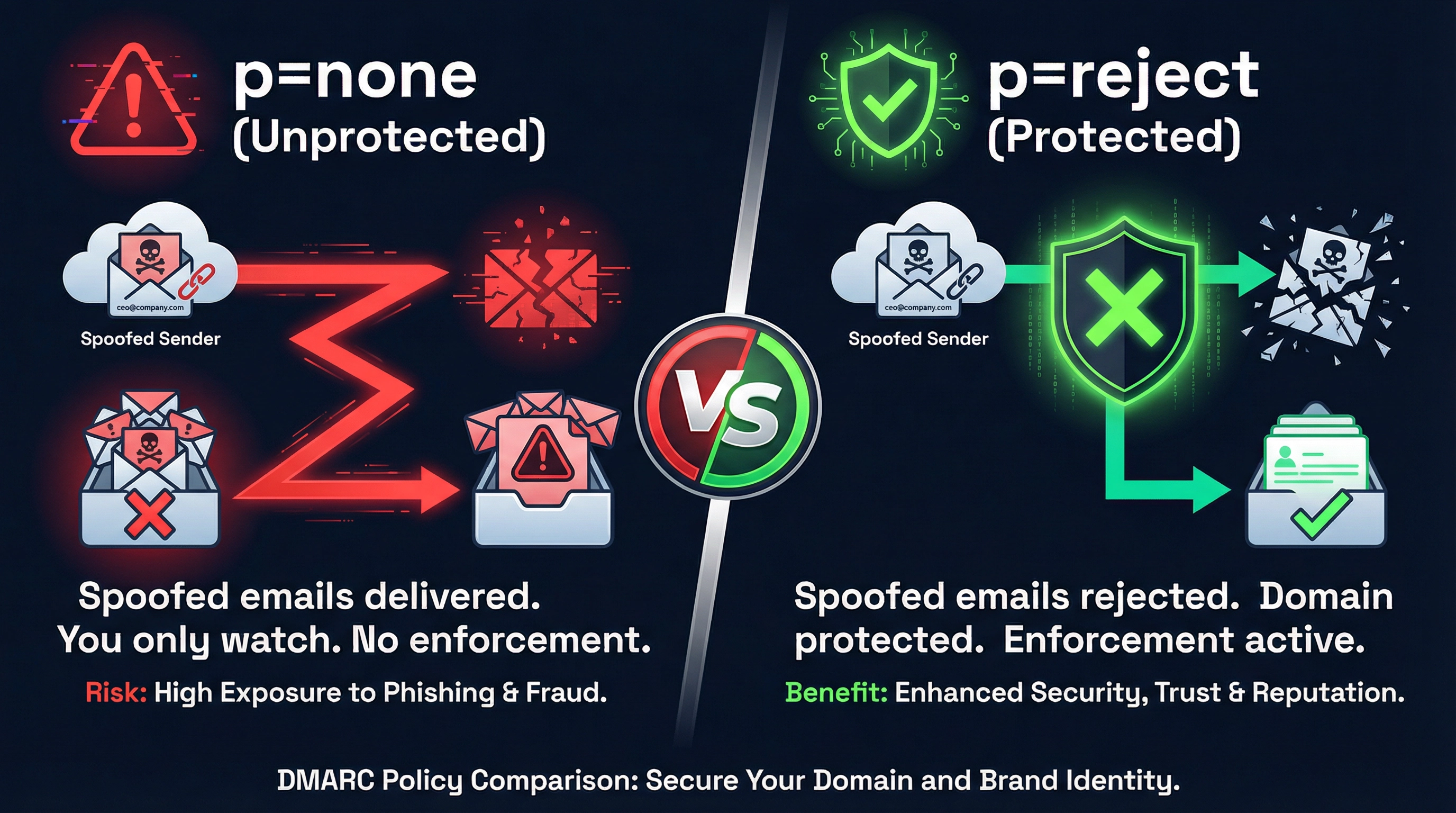
| p=none | Monitor only. Failed emails are still delivered. You receive aggregate reports. | ❌ None |
| p=quarantine | Failed emails are sent to the spam/junk folder. | ⚠️ Partial |
| p=reject | Failed emails are rejected outright and never reach the inbox. | ✅ Full |
Only p=reject actually stops spoofed emails from reaching your customers. Everything else is just observation.
Why Most Domains Are Still Exposed
The majority of businesses that have "set up DMARC" are sitting at p=none. They added the record, they see the green checkmark in DNS checkers, and they believe they are protected.
They are not.
p=none means you are watching. It means you are collecting data. It does not mean you are blocking anything. An attacker can still send a spoofed email from your domain, and it will land in your customer's inbox with your name on it.
The reason most organizations stay at p=none indefinitely is not laziness, it is risk. Moving to p=reject without careful preparation can break legitimate email flows. If you have a CRM, a marketing platform, a billing system, or any third-party tool sending email on your behalf, those services need to be properly aligned before you enforce rejection.
What Happens When DMARC Is Missing or Weak
When your domain has no DMARC record, or is stuck at p=none, attackers can:
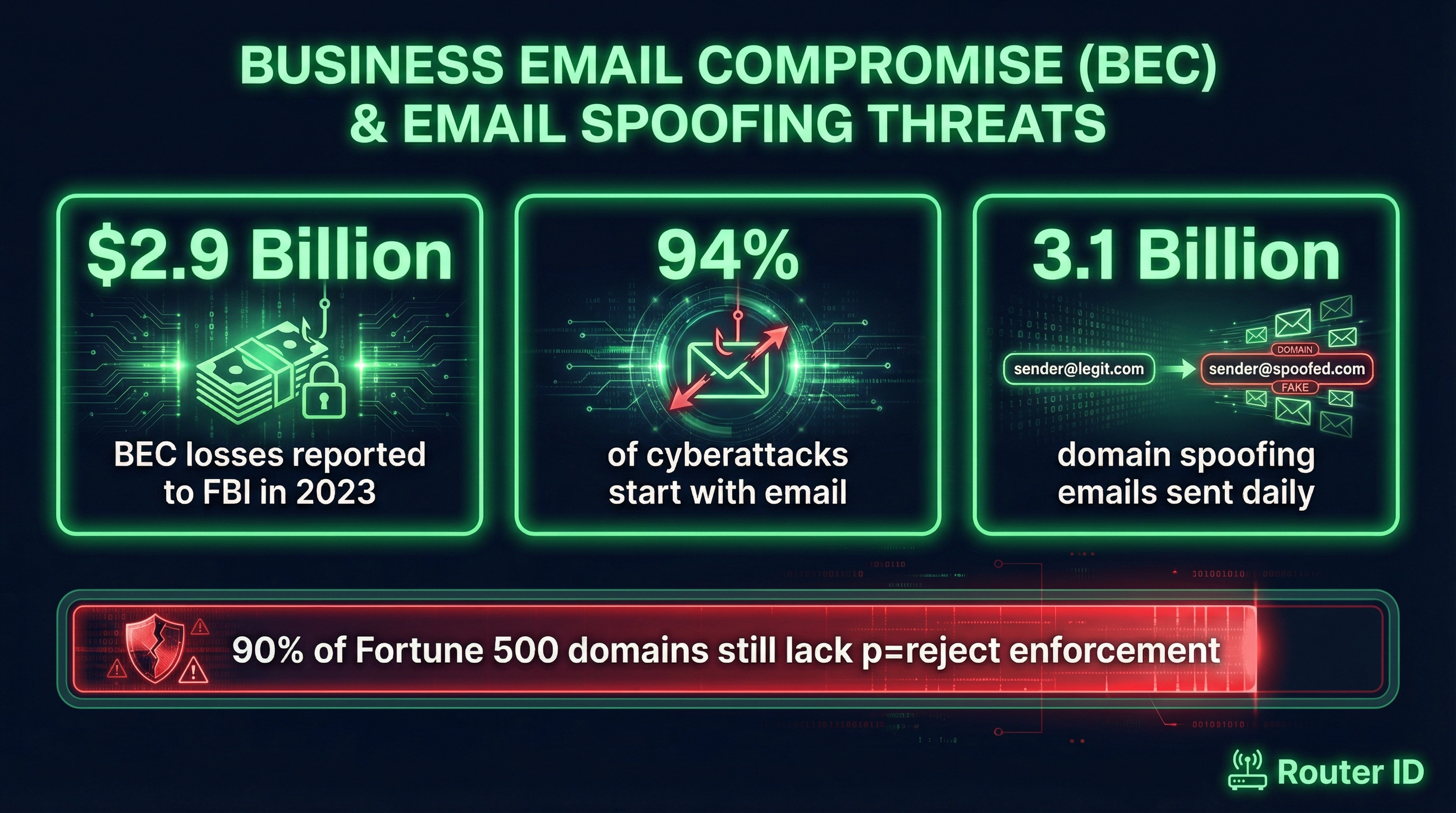
- Impersonate your executives. Business Email Compromise (BEC) attacks often involve spoofed emails from a CEO or CFO directing a finance team member to wire funds. The FBI reported that BEC cost businesses $2.9 billion in 2023 alone... more than ransomware.
- Defraud your customers. An attacker can send invoices, password reset requests, or payment links that appear to come from your domain. Your customers have no way to know the email is fake.
- Damage your domain reputation. Even if individual attacks do not succeed, spoofed emails sent from your domain can trigger spam filters and hurt your deliverability for legitimate messages.
- Bypass your own security controls. Your email security tools protect inbound mail to your organization. They do not protect the emails your domain appears to send to others.
The Path to p=reject: What It Actually Takes
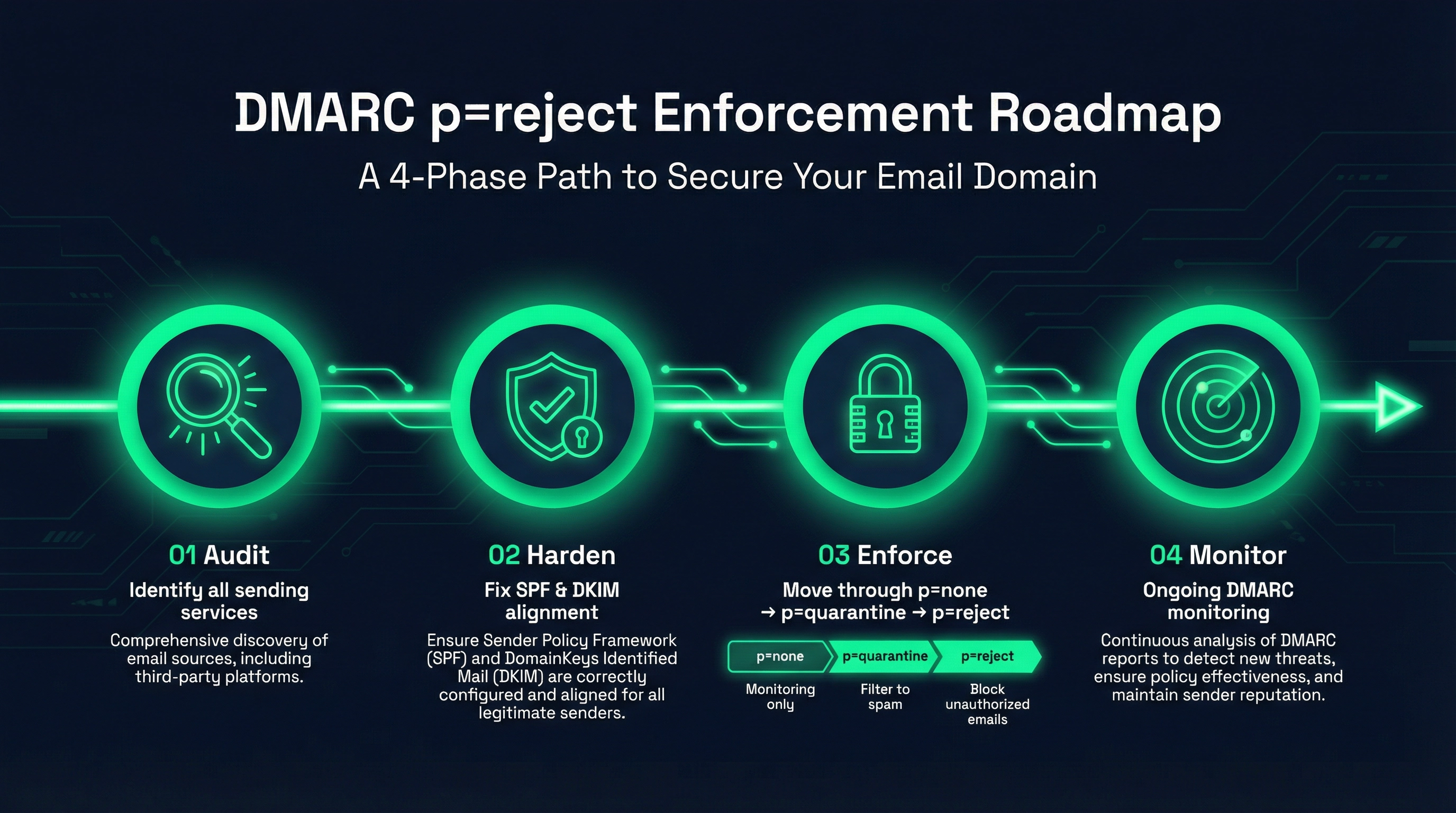
Getting to full DMARC enforcement is a four-phase process. Skipping steps is what causes organizations to break their own email when they try to enforce.
- Audit Your Sending Infrastructure — Before touching your DMARC policy, you need a complete picture of every service sending email on behalf of your domain. This includes your primary mail server, CRM platforms, marketing tools, billing systems, HR software, and any automated notification systems.
- Harden SPF and DKIM — SPF records have a hard limit of 10 DNS lookups. Many organizations exceed this without realizing it, which causes SPF to silently fail. DKIM needs to be configured for every sending service, with keys properly aligned to your domain.
- Move Through the Policy Levels Gradually — Start at p=none to collect data. Review your DMARC aggregate reports to identify all sending sources and their alignment status. Move to p=quarantine once you have confidence. Then move to p=reject once quarantine shows clean results.
- Monitor Continuously — DMARC is not a set-and-forget configuration. New sending tools get added. DKIM keys expire. SPF records drift. Ongoing monitoring is what keeps your enforcement from breaking over time.
How to Check If Your Domain Is Exposed Right Now
You can check your current DMARC status in about 30 seconds. Open a terminal or use an online DNS lookup tool and query your domain's TXT records for _dmarc.yourdomain.com.
If you see no record, your domain has zero DMARC protection. If you see p=none, you are monitoring but not blocking. If you see p=quarantine or p=reject, the policy is in place, but that does not mean your SPF and DKIM alignment is correct, or that all your sending services are properly configured.
A policy record alone is not the same as a properly implemented DMARC deployment.
What Google and Yahoo's 2024 Requirements Mean for Your Domain
In February 2024, Google and Yahoo began requiring DMARC for bulk email senders. Any domain sending more than 5,000 emails per day to Gmail or Yahoo addresses must have a DMARC record at minimum p=none.
This was widely reported as a major shift. What was less widely reported is that p=none is the floor, not the goal. The industry direction is clear: enforcement is coming, and organizations that are not already moving toward p=reject are falling further behind.
For businesses that rely on cold outreach, transactional email, or any communication that lands in Gmail inboxes, the deliverability advantage of a properly enforced DMARC policy is significant and growing.
The Bottom Line
DMARC is not optional infrastructure. It is the technical control that determines whether your domain can be used to attack your customers and partners. A domain without DMARC enforcement is an open door.
The good news is that the path to p=reject is well-defined. It requires expertise and careful sequencing, but it is not complicated when done correctly. The risk is not in implementing DMARC, it is in continuing to delay it.
If you are not sure where your domain stands, the first step is a free domain risk check. We will review your current SPF, DKIM, and DMARC configuration, identify any gaps that leave your domain exposed, and outline what a safe path to enforcement would look like for your specific sending infrastructure.
No software to install. No obligation. Just a clear picture of where your domain stands and what it would take to protect it.
Get Your Free Domain Risk Check →