
Why Palo Alto Segmentation Projects Stall—and How to Move Forward
Your team agrees that access needs to be tighter. The difficult part is changing it without interrupting the work people depend on.
A segmentation project can stall when the next firewall change raises questions nobody can answer: who uses this application, which connections does it need, and what happens if the new rule is wrong?
The way forward is to make the first change small enough to explain and test. This guide shows IT managers and network administrators how to prepare one application for a pilot, identify the gaps that should stop it, and decide when to expand.
Why the project stalls
Consider an illustrative situation. Finance needs a reporting application. A broad rule lets the office reach its server, but nobody is sure whether a supplier, a background job, or another department also depends on that access.
The network team can write a narrower rule. The application owner still needs to confirm what must keep working. Without that agreement, each proposed change creates another round of questions, and the broad exception stays in place.
That is a useful place to start the review. Separate what you can observe from what you suspect, then give each gap an owner.
| What the team sees | What to check | A useful result |
|---|---|---|
| The same change keeps being postponed. | Is there an application owner and an agreed list of permitted tasks? | One owner approves a small access and test plan. |
| A restricted user can still reach the application. | Which path and rule actually handled that connection? | The intended boundary denies the test connection, with evidence. |
| An approved user is blocked. | Is the current account, group, application, or dependency different from the design? | The team can explain the failure and correct its cause. |
These are investigation paths, not proof of what is wrong in your environment. The practical benefit is a decision the team can support with evidence instead of another undocumented exception.
Find the firewall that can enforce the decision
Network segmentation limits which systems can communicate. A Palo Alto firewall can apply that boundary only to traffic that passes through it. If two systems communicate through another path, changing this firewall's policy will not control that connection.
For user-based access, the firewall needs two different answers. User mapping connects the address it sees to the account using it now. Group information tells it whether that account belongs to the approved group. A synchronized directory alone does not establish the current account behind every connection.
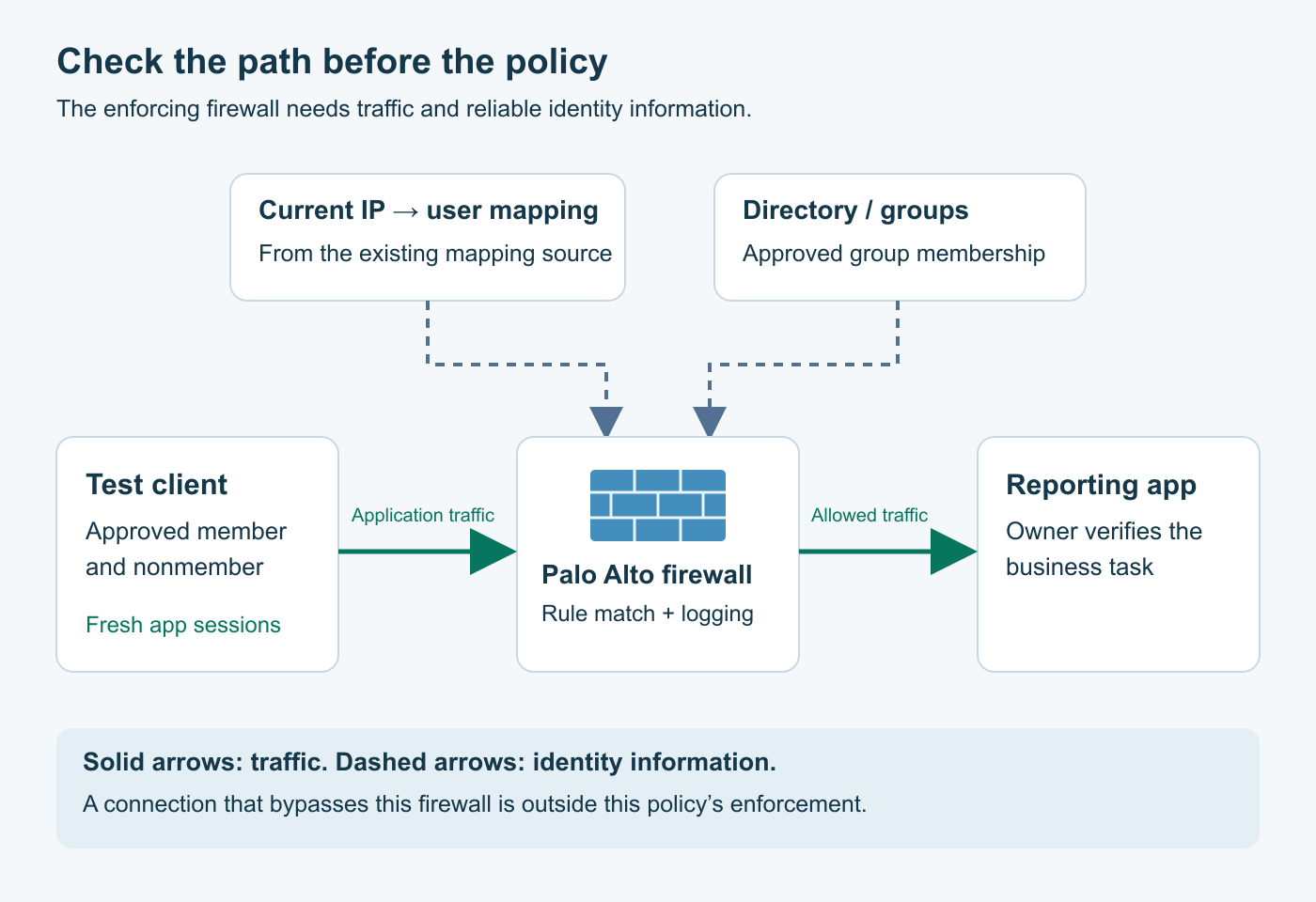
Panorama can manage configuration, but the firewall on the application's traffic path makes the access decision. Keep that distinction clear when checking whether a change actually reached the place where it must work.
User-ID helps express access in terms of people and groups. It does not replace authentication, device checks, application inspection, or application permissions. Use each control where your design requires it; every pilot does not need the same collection of products.
Prepare a small pilot the team can explain
Scope: an existing Palo Alto firewall and a working application, with approved test users and permission to inspect logs and policy. Menu names below follow PAN-OS 12.1 documentation. Confirm them for your installed release. This is a documentation-based readiness walkthrough, not a lab-tested configuration for your network.
If Panorama manages your rules, use your established device-group and deployment process. The local firewall steps here do not replace that process. Have the application owner and change approver involved before enforcement changes.
1. Define the business task and its owner
For our fictional example, members of Finance-Reports should open the reporting application and export a report. A test user outside that group should not reach the application through the pilot path.
Write down the owner, approved group, client and server addresses, source and destination zones, normal application ports, and the task to test. Get the values from the application owner, current network design, and observed traffic. Record required background jobs and who will test them.
The result should be an access statement everyone understands. If nobody can approve who needs the application, resolve that before writing the enforcement rule.
2. Observe the task and its dependencies
On the enforcing firewall, open Monitor > Logs > Traffic. Have the approved user perform the task, then narrow the view to that time and those client/server addresses. Inspect the source and destination zones, application, matched rule, action, and session end reason. The Traffic log documentation describes those fields.
If the expected session is missing, check the time range, filters, rule logging, and traffic path before deciding that the application has no traffic. Logs written at session end may not appear while a connection is still active.
Ask the owner about services the task depends on: name resolution, sign-in, database access, file transfers, backup, or scheduled reporting. Review a representative business cycle; a quiet afternoon is not evidence that a month-end job is unnecessary.
In Policies > Security, open the relevant rule and inspect its Applications tab. Review the App-ID dependencies shown for the selected applications. These protocol dependencies are one input. They do not describe every service the business application uses.
3. Confirm identity at the enforcement point
Compare Source User in the test session with the account that actually connected. Verify that the firewall has the relevant group information and that the test account resolves to the approved member. Repeat with the nonmember.
An unknown user, stale mapping, shared address, or proxy can change what that evidence means. Investigate the source of the mapping and the address the firewall sees before depending on the group rule. Do not fix missing identity by opening access to everyone.
Palo Alto's User-ID verification guidance covers these checks. For a fuller configuration example, use our practical User-ID pilot guide.
4. Check what rule will actually win
Review the effective rule order in Policies > Security. PAN-OS uses the first matching rule; an earlier broad allow can prevent the intended boundary from taking effect. Default same-zone and between-zone behavior also differs, so inspect the actual rules. See Palo Alto's Security policy rules.
For a lookup against the running policy, open Device > Troubleshooting and choose Security Policy Match. Enter the real From and To zones, Source and Destination addresses, Destination Port, Protocol, Source User, and Application for the proposed test. For TCP, the IP protocol number is 6. Execute the test and inspect the result; repeat for the nonmember. The field reference explains the inputs.
A policy lookup checks rule matching for the values you supply. It does not create traffic, prove the user's mapping is current, or confirm that the business task works. Use it to find a mismatch before moving to actual session tests.
Agree on a narrowly scoped allow rule and the rule that will deny access outside that scope. Review ordering, dependencies, logging, and existing security profiles together. Do not add a blanket deny or remove inspection across unrelated applications to simplify the pilot.
Test the business task and the boundary
After the approved pilot changes are committed, create fresh application sessions and record what actually happens. A successful commit confirms that configuration was accepted; it is not the application's acceptance test.
| Test | Evidence to keep | If it differs |
|---|---|---|
| Approved member opens the app and exports a report. | Task succeeds; traffic matches the intended allow rule and expected account. | Check identity, selected application, dependencies, policy order, and relevant threat logs. |
| Nonmember starts a fresh connection to the same app. | Intended boundary blocks it; matched rule and action explain the denial. | Check earlier broad rules, default rules, existing sessions, and bypass paths. A failed app login alone does not prove network enforcement. |
| Owner exercises required jobs and supporting services. | Representative work completes across the agreed observation period. | Trace the missing connection with the owner. Scope the correction to the verified dependency. |
| Test user reconnects through the supported access path. | Current identity is still correct and the expected rule still matches. | Check mapping source, address changes, group data, and any shared-address limitations. |
Record the test time, account, relevant addresses, matched rule, action, and the owner's result. Leave the result blank until the test is performed. Keep this evidence inside your organization's approved records.
A passing pilot supports the particular users, paths, and tasks you tested. It does not establish that every application or alternate route is covered.
Plan recovery before making the change
Agree on the change window, management access, person who can reverse the change, and the trigger for doing so. An approved task failing or an unexpected dependency being blocked can be a stop condition.
Before the approved change, use Device > Setup > Operations > Export named configuration snapshot and select the current running configuration, commonly running-config.xml. Store the export securely. Record any pending changes separately: a candidate snapshot can contain work that is not running yet.
Prefer a reviewed reversal of the pilot's specific changes. If the recovery plan requires loading an earlier configuration, review what it will replace, including other administrators' work. Loading changes the candidate configuration; a commit is required to activate it. The Operations reference distinguishes these actions.
Confirm application service again after rollback and record any access temporarily restored. Recovery gets the business working; the original access gap still needs an owner and a next step.
Make the go/no-go decision visible
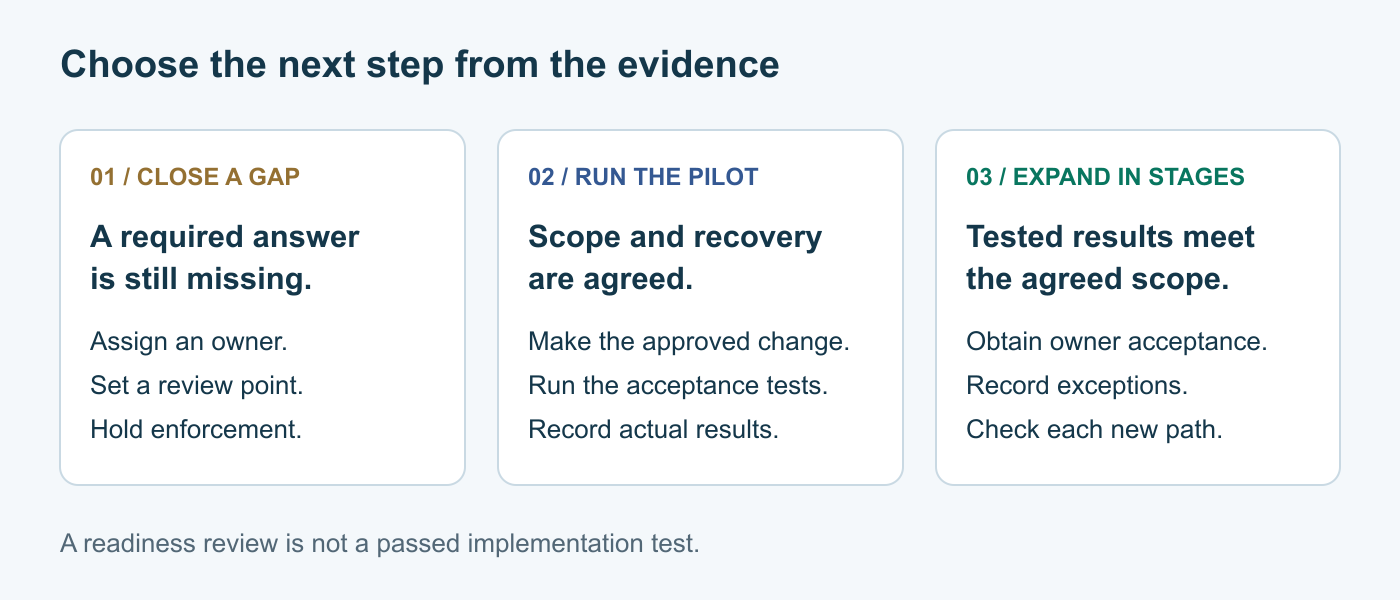
At the end of the review, choose the next action from the evidence:
- Close a gap first: the owner, path, identity, dependencies, or recovery plan is still unclear. Assign the missing work and a review point.
- Run the pilot: the scope and recovery are agreed, and the required information is available. The acceptance tests still need to be performed.
- Expand in stages: the pilot's allowed and denied tests pass, the owner accepts the business result, and remaining exceptions are documented. Assess each new path before bringing it into scope.
Give temporary exceptions an owner, a reason, and a review date. Otherwise the same uncertainty can return after the first rollout.
Choose your next step
Bring one application, its owner, one approved group, and one nonmember test account to the next planning session. Use the segmentation readiness checklist to organize the questions. Start with the smallest useful boundary your team can verify.
Your internal team may have everything it needs for a simple pilot. Consulting becomes useful when the project spans several sites, competing identity sources, inherited broad rules, or dependencies that nobody owns. Ongoing rule reviews and change support can be discussed as part of Infra Protection.